


Export to Excel Not Working

Jan 10, 2017
 136
136
If you are having problems exporting DH-CCM reports to Excel, you may need to adjust your pop-up blocker settings in Google Chrome.
Please follow these step-by-step instructions:
- Open Chrome and click the “Pop-up Blocked” icon (shown below).
Note: If the icon does not appear, these instructions will not help. Contact the Dulcian Health Support Staff at [email protected] for further assistance.

- The “Manage pop-up blocking” window displays.
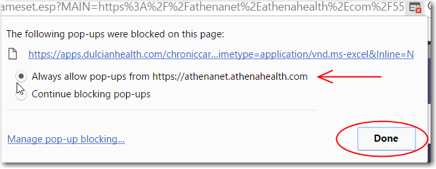
- Click “Always allow pop-ups from https://athenanet.athenahealth.com”
- Click Done
- Clicking the DH-CCM Export to Excel button should now work. It will download the file to your computer.
- If you continue to have problems, please contact the Dulcian Health Support Staff at [email protected]

